User Interview Script and Notes
18 questions and a notes sheet per participant. Figma, Arabic and English, light and dark.
What is a user interview?
A user interview is a discovery conversation with one participant at a time. A script sets the questions in order, from warm up and context to the last time, the pain and the workaround, and the wrap up. A notes sheet keeps quotes, observations, and follow ups apart, and each session closes with an insight, pain, or idea tag.
- downloads16
- Files3
- LanguagesEN and AR
- FormatsFigma and PDF
- Updated
What is inside
The User Interview Script and Notes is a free Figma template by Laith Aljunaidy for discovery interviews. A script of 18 numbered questions in five sections with the running time, a notes sheet per participant with columns for quotes, observations, and follow ups, and three closing tags: insight, pain, idea. One Figma file with four pages, English and Arabic, light and dark, on one variable collection, plus an 8 page PDF guide. Free on Gumroad. The Pro edition, 10 dollars, adds five Claude prompts, a facilitation guide, a second worked example, and a Claude Code skill.
You book the session, then write the questions in the ten minutes before it starts. Two questions in you are leading the participant, and by the third session nobody remembers what the first one actually said.
What is on the User Interview Script and Notes board?
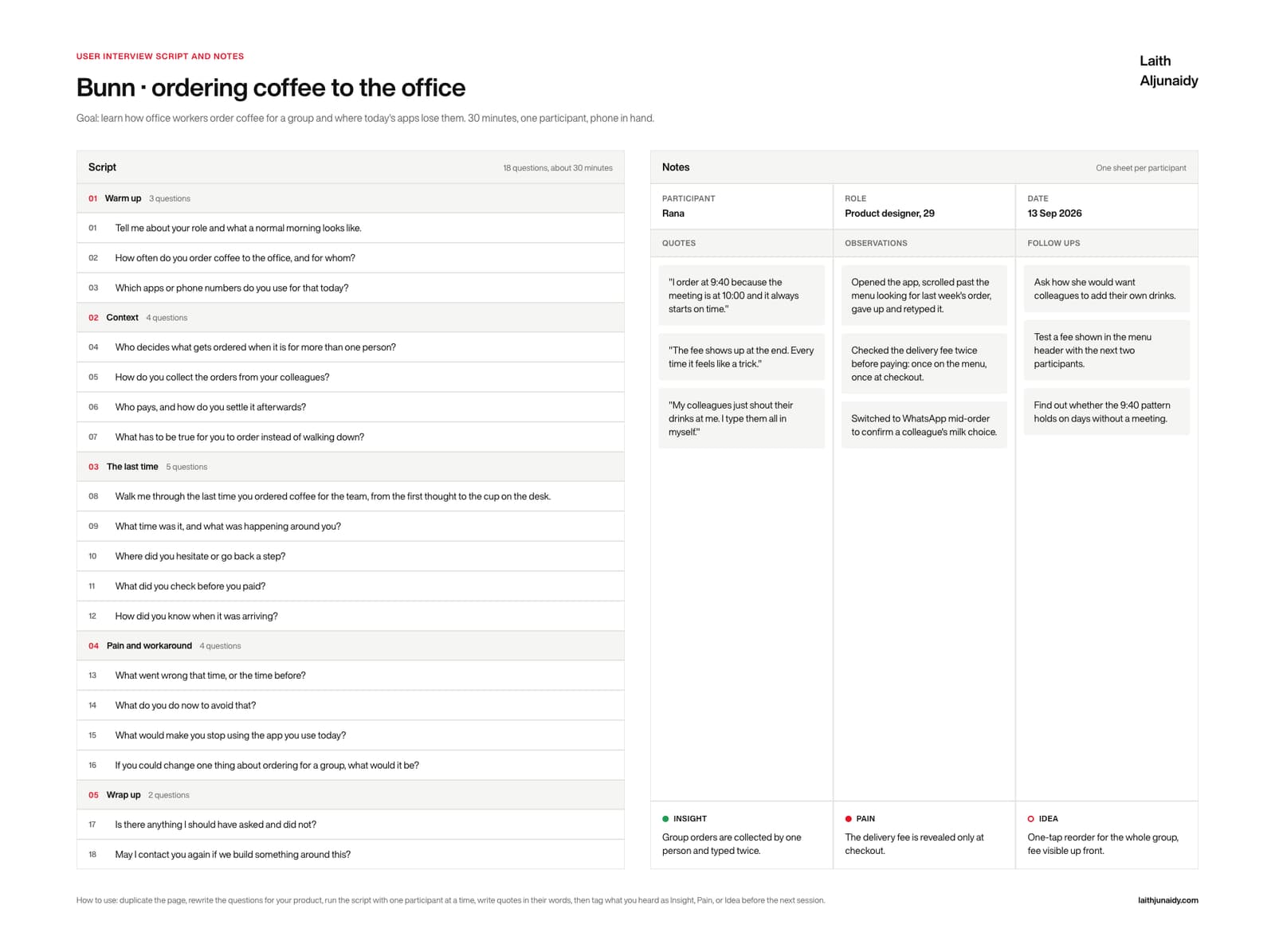
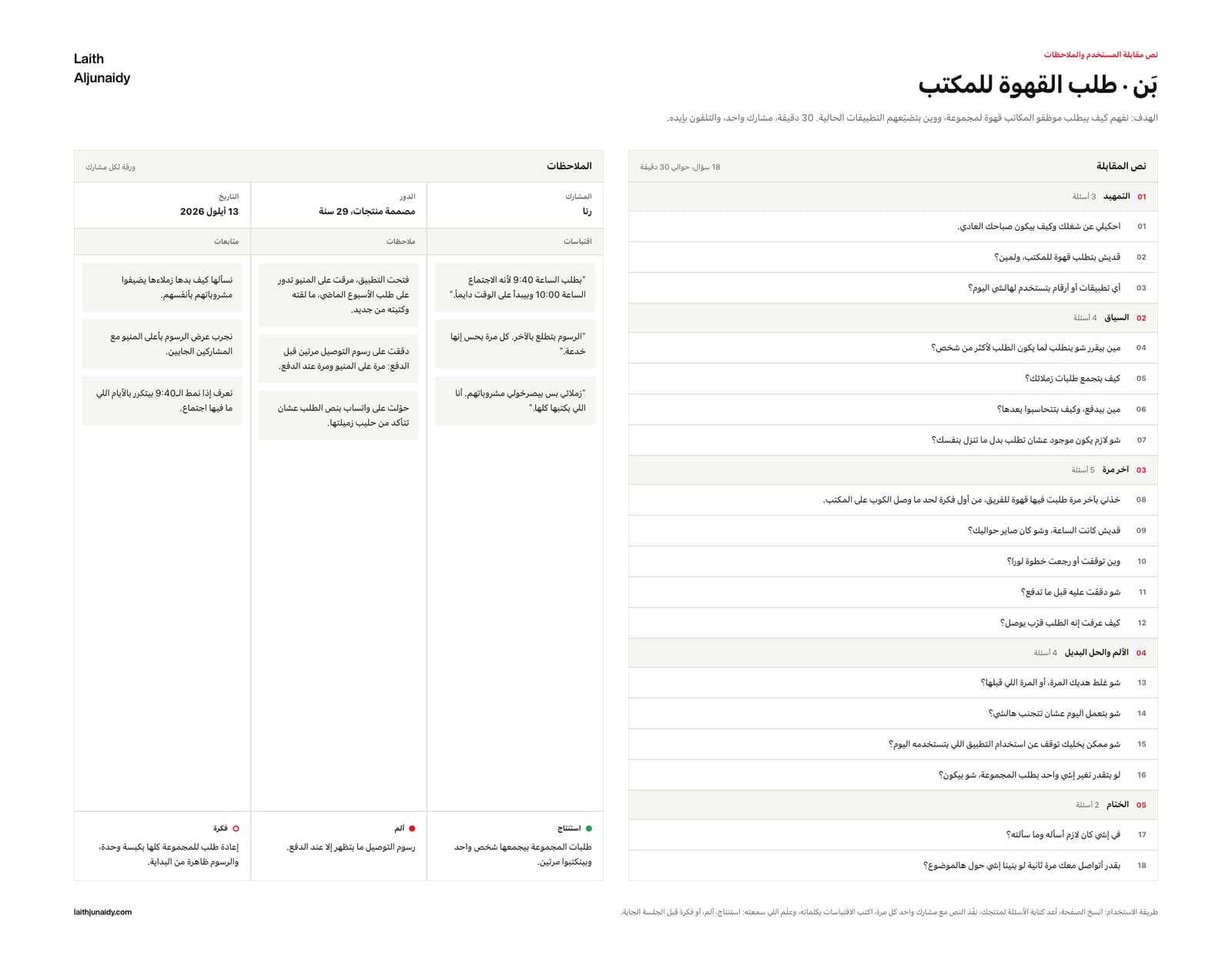
The User Interview Script and Notes board is one Figma canvas with four parts, built in 2026 with auto layout so every cell grows as you type:
- Script, the left column. 18 numbered questions in five sections: Warm up (3), Context (4), The last time (5), Pain and workaround (4), Wrap up (2). The header carries the count and the running time. Each question is its own text layer, so you can rewrite, reorder or delete one without breaking the layout.
- Notes, the right column. One sheet per participant. A row for name, role and date, then three sticky columns: Quotes, Observations, Follow ups.
- The closing tags. A strip across the bottom of the notes sheet with three tags to fill before the next session: Insight, Pain, Idea. One line each.
- The header. Project name, and a goal line that states what the session is for, how long it runs and how the participant is holding the product.
What changes when you use the User Interview Script and Notes?
The User Interview Script and Notes template is a fix for six common habits in how teams run this step. Each of the 6 pairs below shows the habit first, then what the template puts in its place. For example, the template turns questions invented on the way to the call into eighteen questions written down, sectioned and timed.
- Before: Questions invented on the way to the call.
After: Eighteen written down, sectioned and timed. - Before: “Would you use this?”
After: “Walk me through the last time you did it.” - Before: Notes in a document nobody reopens.
After: One sheet per participant, the same shape every time. - Before: Quotes paraphrased from memory.
After: Quotes in the participant’s own words, in their own column. - Before: Five sessions and no idea what changed.
After: Every session closed with one Insight, one Pain, one Idea. - Before: An English script read aloud in Arabic, badly.
After: A Levantine script on a board built right to left.
What is in the User Interview Script and Notes download?
The free User Interview Script and Notes download is one Figma file with four pages, English light, English dark, Arabic light and Arabic dark, on one variable collection, plus a 8 page PDF guide, made in 2026 with Figma variables. The Pro edition costs $10 and adds five Claude prompts, a facilitation guide, a second worked example and a Claude Code skill.
- FIG The template. One Figma file, four pages: English light, English dark, Arabic light, Arabic dark, all on one variable collection. Auto layout throughout, so every cell grows as you type.
- PDF The guide. 8 pages: the four boards, a five step how to use, and a glossary of every field with its Arabic label beside it.
- PDF, MD Pro. Five Claude prompts: fill it from my notes, critique it, Arabic edition, turn it into insights, push it to Figma.
- PDF Pro. The facilitation guide. A thirty minute session: what to ask, in what order, and how to close it.
- FIG Pro. A second worked example in a second market, as its own Figma file, so you can read the method instead of guessing at it.
- FOLDER Pro. The Claude Code skill. Point it at your notes folder and it fills the board, then writes it into your own Figma file by layer name.
Who is the User Interview Script and Notes for, and when should you run it?
The User Interview Script and Notes is for product designers, founders and researchers running discovery. Run it before you draw a screen: five to six participants, thirty minutes each, one sheet per person, then tag what you heard before the next session starts.
In practice, keep the User Interview Script and Notes beside the design file, where the team can reread it before each decision. Two editions. Free: the Figma file and the 8 page PDF guide. Pro, $10: adds the five Claude prompts, the facilitation guide, the second worked example and the Claude Code skill.
Paid
Go further with the paid kits
The nine templates at their Pro edition in one kit, or your design system as a folder Claude reads.